Last year, a business I know got hit. Not a big company — a small operation, maybe 12 staff. Someone got into their email, monitored the inbox for a few days, and then sent an email to their accounts payable person requesting an “urgent payment” to a new bank account.
The email came from the boss’s actual email address. It looked real. The language was right. The urgency was convincing.
They paid $18,000 before anyone noticed.
This isn’t unusual. It’s happening every day, all over the world, to businesses just like yours. And it’s not because the criminals are genius hackers. It’s usually because the basics weren’t in place.
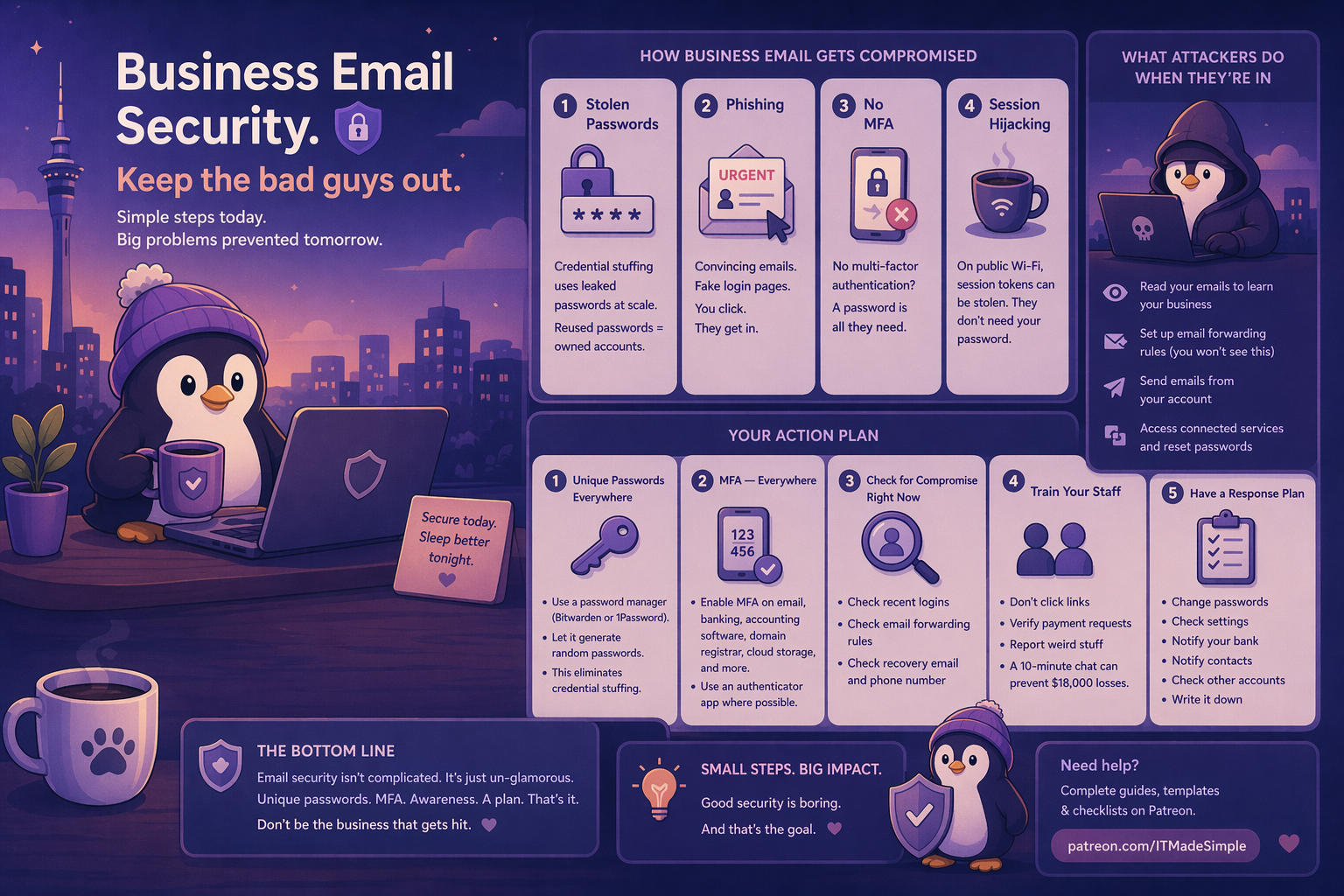
How Business Email Actually Gets Compromised
Forget the Hollywood image of a hooded figure typing furiously. Here’s what actually happens, in order of how common it is:
1. Stolen Passwords (The Big One)
Your password leaks in a data breach. It ends up on a list that gets sold on the dark web. Criminals use automated tools to try that same password on email, banking, accounting software — everything.
This is called credential stuffing, and it works because people reuse passwords. If your email password is the same one you used on that random forum in 2019 that got breached, your business email is one automated script away from being owned.
2. Phishing
Someone sends you an email that looks like it’s from Microsoft, your bank, or a supplier. There’s a link. You click it. You land on a fake login page that looks identical to the real one. You type in your username and password. You’ve just handed your credentials to a criminal.
Modern phishing is good. Really good. The fake pages are pixel-perfect. The sender addresses are close enough to fool you when you’re busy. The urgency (“Your account will be locked in 24 hours!”) pushes you to act before thinking.
3. No Multi-Factor Authentication
Even if they get your password, MFA stops them cold. But if you don’t have it enabled, a password is all they need. Full stop.
4. Session Hijacking
You log into email on a public Wi-Fi at a café. Someone on the same network could intercept your session token. They don’t need your password — they’re already “you” as far as the server is concerned.
Less common for small businesses, but it happens. Especially if you’re checking email at the airport, a hotel, or a coworking space.
What It Looks Like When You’re Compromised
You might not know right away. Sophisticated attackers don’t change your password (that would tip you off). They just quietly:
- Read your emails to learn how your business works, who your suppliers are, how you talk to your bookkeeper
- Set up email forwarding rules to send copies of certain emails to their own address (you won’t see this unless you check your settings)
- Send emails from your account to your contacts, your bank, your staff — whatever serves their purpose
- Access connected services — if your email is the recovery address for your bank, your accounting software, your domain registrar, they can reset passwords on all of them
The business I mentioned earlier? The attacker watched their inbox for almost a week before making a move. They learned the business’s patterns, who handled payments, what the boss’s writing style looked like. Then they struck.
How to Lock It Down
Here’s your action list. Do these in order.
Step 1: Unique Passwords Everywhere
Every account gets its own password. No exceptions. Use a password manager — Bitwarden (free) or 1Password (paid, excellent). Let it generate random passwords. You don’t need to remember them.
This single step eliminates credential stuffing entirely.
Step 2: Multi-Factor Authentication — Everywhere
I covered this in the security audit post, but it bears repeating: MFA is the single most effective security measure you can take.
Enable it on:
- Email (M365, Gmail, whatever you use)
- Online banking
- Accounting software
- Domain registrar (this one gets overlooked — if someone takes over your domain, they can intercept all your email)
- Cloud storage
- Social media
Use an authenticator app (Microsoft Authenticator, Google Authenticator, Authy) rather than SMS if possible. SMS is better than nothing, but it can be intercepted through SIM swapping.
Step 3: Check for Compromise Right Now
A few things to check today:
- Recent login activity. In M365, go to your account security page and check recent sign-ins. Look for locations or devices you don’t recognise. In Gmail, scroll to the bottom of your inbox and click “Details” under “Last account activity.”
- Email forwarding rules. Check if any rules are forwarding emails to an address you don’t recognise. In Outlook: Settings > Mail > Forwarding. In Gmail: Settings > Forwarding and POP/IMAP.
- Recovery email and phone number. Make sure your account recovery options actually point to your current email and phone number. Attackers often change these so they can regain access even after you change the password.
Step 4: Train Your Staff
This is the hard one. You can have the best technical controls in the world, but if your office manager clicks a phishing link and enters their credentials, the controls don’t matter.
You don’t need a corporate training program. You need a 10-minute conversation:
- Don’t click links in emails that ask you to log in. If Microsoft says your account is expiring, open a browser and go to microsoft.com directly. Don’t click the link.
- Verify payment requests. Any email asking for a bank transfer, especially if it’s “urgent” or “confidential” — verify by phone. Use a number you already have, not one in the email.
- Report weird stuff. If something feels off, tell someone. Don’t feel embarrassed. The businesses that recover fastest are the ones where staff speak up quickly.
Step 5: Have a Response Plan
If the worst happens, what do you do?
- Change passwords immediately — email first, then everything else
- Check forwarding rules and recovery options
- Notify your bank if there’s any chance financial accounts were accessed
- Notify your contacts — if the attacker sent emails from your address, let people know
- Check other accounts — if your email was compromised, assume any account that uses it as a recovery address is also at risk
Write this down. Don’t figure it out in the moment.
The Bottom Line
Email security isn’t complicated. It’s just unglamorous. Unique passwords, MFA, basic staff awareness, and knowing what to do if something goes wrong. That’s it.
The businesses that get hit aren’t the ones with bad luck. They’re the ones that never turned on MFA, never checked who had access, and never talked to their staff about phishing.
Don’t be that business.
I’ve put together a complete MFA rollout guide and staff awareness kit on Patreon — including step-by-step MFA setup for M365, a one-page staff handout on phishing, and an incident response checklist you can fill in with your own details. Get it here.